How long can I walk away?
When you hand a long task to a coding agent, the honest question isn't "is it working?" — it's "how long have I got?" This is a small skill that gives Claude Code a live, self-correcting ETA — away until 16:45 — so you can spend the wait on the work that actually needs you instead of watching the screen. It pings you only when that time moves.
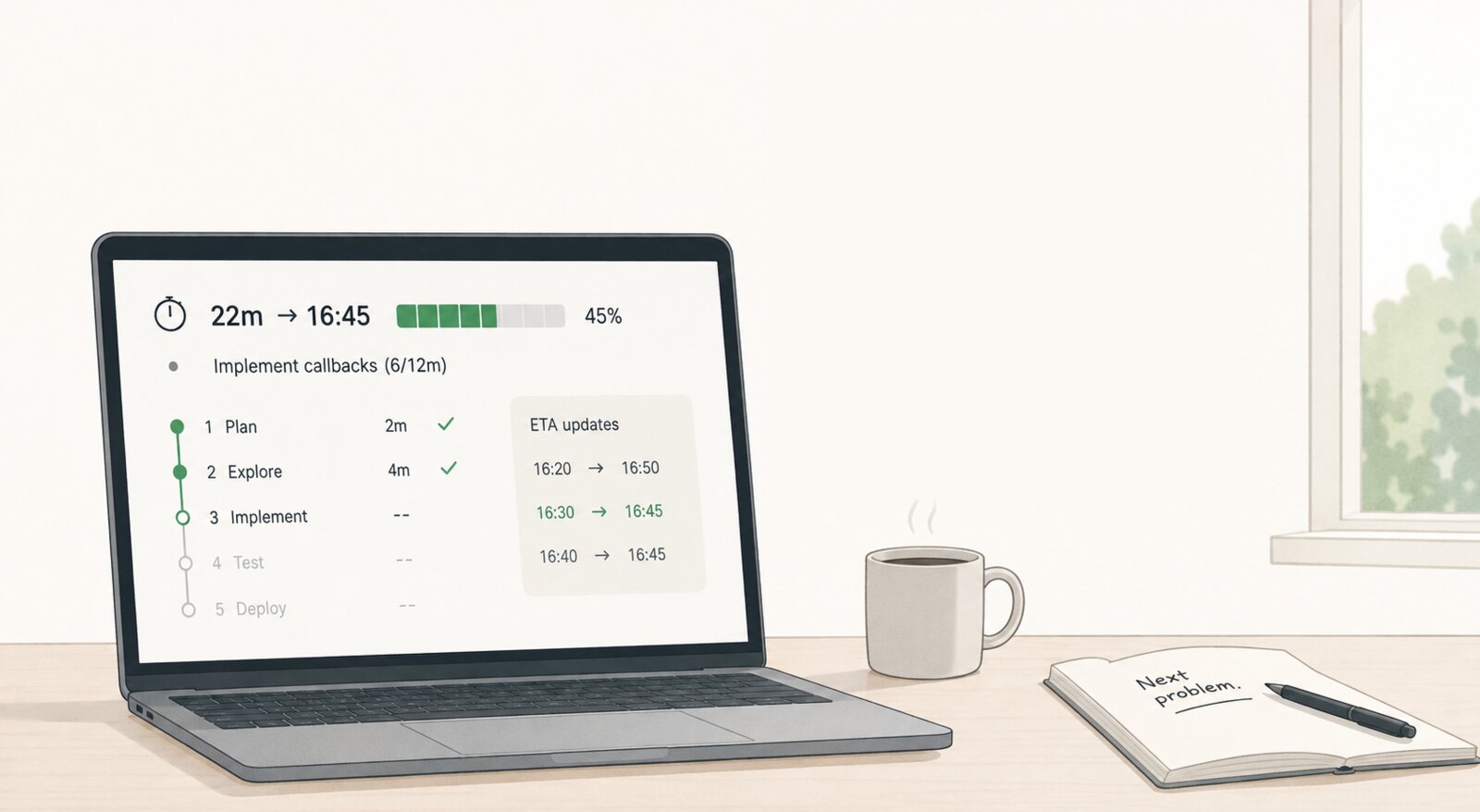
The more you let a coding agent run on its own — a loop that keeps going until the goal is met — the more you find yourself with time on your hands while it works. The worst thing to do with that time is spend it watching the screen. Implementation stopped being the hard part; sitting there supervising the typing is dead time. The point of handing the work off is to parallelize — to pick up the part that actually needs you (the next problem, the design, the framing, another project entirely) while the machine handles the part that doesn't.
Which turns one small question into the most useful one you can ask: how long? Not mainly so I can take a break — though you can — but so I know how big a block of real work I can start before I need to be back. Knowing the finish time lets you plan your own hours as deliberately as you planned the agent's, instead of burning them idling in front of a progress log.
The trouble is that Claude can't tell you. Ask an agent "how long will this take?" and you get a number pulled from thin air — and worse, it has no idea how much time has actually gone by while it works. A language model has no clock.
So I built a small skill to give it one, honestly: claudestimate.
Split the plan from the clock
The trick is a division of labour, and it's the whole reason the number is trustworthy instead of invented.
| Who | Provides |
|---|---|
| Claude (the skill) | The plan — steps, sub-agents, estimated minutes — and it re-plans when it discovers work: a red test, a bug, a deploy slower than expected. It never writes a real timestamp; that's the one rule. |
| The engine (bash + awk) | The clock — it stamps how long each step actually took, recalibrates the estimate from what already happened, and decides when to alert you. |
Claude does what it's good at — decomposing the task and judging effort — and stays out of what it can't do, which is measure time. The result isn't a stopwatch; it's a self-correcting forecast. The first estimate is rough, and by the second or third step it has converged on real data.
And the unit is deliberately not "22 minutes left" — a countdown you'd have to keep re-checking — but "away until 16:45", a clock time you can plan around and then forget.
Where you see it
Two places, no ceremony. A statusline in Claude Code, always in view:
⏱ 22m → 16:45 ▓▓▓░░░ 45% · Implement callbacks (6/12m)And a web dashboard with the progress bar, the step timeline, every time the estimate was revised, and a task history — so that after the fact you can see whether the forecast was worth trusting. It's configurable from one panel: English or Spanish, alert thresholds, update cadence, and the model.
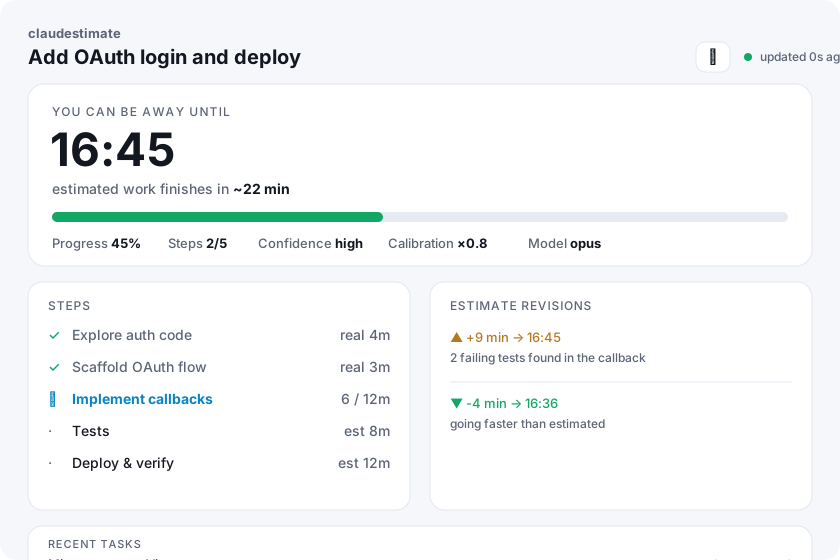
Because you're going to be away from the keyboard anyway, it closes the loop the way telegram-bridge does: point it at a Telegram bot and it pings you only when the finish time actually moves — come back sooner if it sped up, extend your break if it slipped. Not a notification every thirty seconds; one message when the plan changes.
Why "honest" is the whole point
The easy version of this tool would print a confident number and be wrong. Two things keep it from that.
First, it estimates in Claude's wall-clock, not human effort. Early on I estimated each step in "how long would a person take," and the ETA overshot by roughly 2× — a five-step toy project I instrumented came in at 6.9 real minutes against a 14-minute guess. Estimating in the agent's own pace fixed it.
Second, it calibrates per step-type. Exploring, editing code, running tests and waiting on a deploy have very different rhythms, and a deploy shouldn't be re-timed against how fast code gets written. With that split, the "away until" time converges to under a fifth of a minute of error after two of five steps — once you're about 40% in, you know the finish to the quarter-minute. It's model-aware, too: it detects whether you're on Opus or Sonnet — Opus reasons more, so it's slower — and seeds the first guess accordingly, before real data takes over.
When a task ends, it prints the drift between the initial estimate and reality, in minutes and percent, so you can decide whether the forecast earns its place:
── Estimate deviation ──
Task:      Add OAuth login and deploy
Estimated: 20 min   ·   Real: 18.4 min
Deviation: -1.6 min (-8%)   Very accurate ✓
A 20-minute task that lands within 2 is worth it; one that drifts 15 isn't — and now you can tell the difference at a glance, task after task, in the history.
Install
bash, awk and curl are already on any Mac or Linux, so there is nothing to npm install; the dashboard rides on python3, also already there.
git clone https://github.com/jcordon5/claudestimate.git
cd claudestimate
./install.sh
It adds the statusline, drops in the skill and a /claudestimate command, and opens the dashboard with a short tutorial. Restart Claude Code once, and from then on — in any project — Claude fills in the plan by itself on long tasks, and you get a finish time you can actually plan around. It pairs naturally with the way I already hand big jobs to an agent: the plan that drives the work can also tell you when it'll be done.
The thread running through these notes is that the agent increasingly works without you at the keyboard — and the point of that isn't idleness, it's spending your attention on the work that needs it while the machine handles the work that doesn't. If it's going to run on its own, the least it can do is tell you — honestly — how long you've got.