You don't need to "stop prompting". You need to learn when to turn prompts into loops.
For years we talked about prompt engineering as if the main challenge were finding the right sentence. With modern agents a practical difference appears: many tasks should no longer be solved with a single answer, but with a cycle of work.
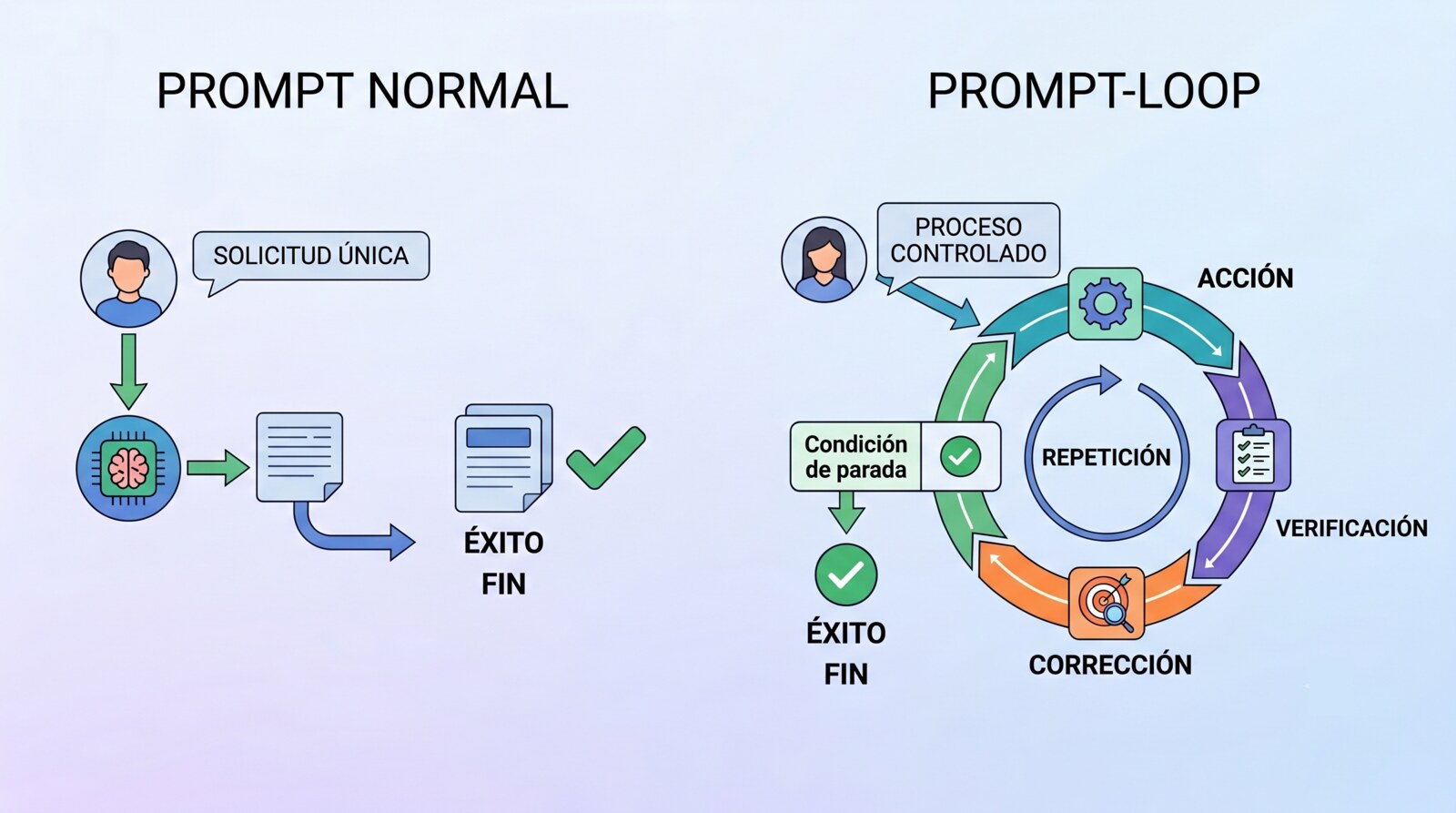
Better context, better role, better format, better examples. All of that still matters. But that cycle now tends to be called a loop.
The term can sound newer than it really is. In its simplest form, a loop is not magic and not a new profession separate from prompting. It's a well-designed prompt that includes a goal, verification, repetition, correction and a stop. The difference is not using a new word. It's that you stop asking for an output and start specifying a controlled process.
A prompt asks for an answer.
A loop defines a way of working until a condition is met.
That's the useful distinction.
What a prompt is
A prompt is an instruction given to a model to produce an output or take an action. It can be simple:
Summarise this article in five points.It can be more specific:
Summarise this article for a technical audience, separating the main thesis, arguments, limitations and conclusions. Don't add external information.And it can be very well designed:
Analyse this article for a technical audience.
Goal: extract the thesis, assess the strength of the arguments and detect possible exaggerations.
Format: executive summary, critical analysis and practical recommendations.
Quality criteria: don't invent information, separate facts from opinion, and flag uncertainty when the text provides no evidence.
That last one is no longer "write something." It's a work specification. But it's still a normal prompt if the model runs once, delivers the result and stops.
What a loop is
A loop is a cycle of work that repeats until an exit condition is met.
Its basic structure is:
goal → action → verification → correction → repetition → stopAn example in development:
Goal: get CI green.
Action: read logs, reproduce the failure, fix the root cause.
Verification: check the latest CI run.
Correction: if it fails, diagnose again.
Stop: finish when the latest run is success, or when the max iterations are reached.
This is no longer a simple request for an output. It's a task with feedback.
The critical part is verification. Without verification there is no reliable loop. There's a long conversation.
A serious loop needs to know when it's done. "Do it better" doesn't work. "The tests pass, the lint is clean and the API contract doesn't change" does.
Not every iterative prompt is a loop
Many prompts look like loops but aren't.
This is not a loop:
Improve the code and make sure everything is fine.Neither is this:
Review your answer before replying.They're good intentions, not verifiable cycles.
This one starts to be a loop:
Fix the authentication module.
After each attempt, run:
npm test -- tests/auth
npm run lint

If a command fails, read the error, diagnose the root cause and fix it.
Don't finish until both commands pass or you reach 6 iterations.
Don't disable tests, don't soften lint rules, and don't change the public API.
Here there's already a goal, check commands, behaviour on failure, constraints and a stop.
How to tell if a prompt creates a loop
A prompt creates a loop if it contains these elements:
- A verifiable goal.
- An initial action.
- An objective check.
- A rule to decide whether to continue.
- A rule to correct if it fails.
- A limit on iterations, time or cost.
- A stop condition.
- Guardrails against fake shortcuts.
If verification is missing, it's not a loop.
If repetition is missing, it's not a loop.
If the stop condition is missing, it's not a controlled loop; it's drift.
If the model can "approve itself" with no external evidence, the loop is weak.
Normal prompt vs prompt-loop
The difference isn't length. It's the nature of the task.
Use a normal prompt when the task is direct, bounded and easy to review:
Summarise this text.
Translate this paragraph.
Give me three alternative titles.
Explain this concept.
Rewrite this email in a professional tone.
Use a prompt-loop when the task depends on iteration, tools or verification:
Fix a bug until the tests pass.
Research a topic until the claims are validated against sources.
Improve coverage until it reaches 85%.
Refactor without breaking the public contract.
Generate a proposal and review it against a rubric.
Watch CI until it's green.
The simple rule:
If you can evaluate the result in one pass, use a normal prompt.
If the work needs to try, measure, correct and repeat, use a loop.
The common mistake: thinking the loop is the command
Some tools have commands like /goal, /loop or similar mechanisms. They're useful because they keep the cycle alive without the human having to relaunch instructions by hand.
But the command is not the loop.
The command only executes the repetition.
The real loop lives in the specification:
what you want to achieve
how it's checked
what's allowed to be touched
what's forbidden
what to do on failure
when to stop
what to report at the end
Without that specification, a /goal is just a faster way to repeat a bad prompt.
The foundation is still a good prompt
There's an exaggerated narrative that says: "stop prompting, start designing loops." It's a catchy line, but imprecise.
The correct version would be:
"Stop writing vague prompts. Design prompts with a goal, context, constraints, acceptance criteria and, when needed, verifiable repetition."
A loop contains prompts. It doesn't replace them.
The prompt defines intent.
Verification defines truth.
The loop defines repetition.
Constraints protect the system.
The stop condition keeps the agent from drifting.
Anatomy of a good prompt
A good prompt isn't necessarily long. It's precise. It should answer seven questions.
1. What you want to achieve
Bad:
Improve this code.Better:
Reduce the complexity of the authentication module without changing its public API.2. What "done" means
Bad:
Make sure it works.Better:
Done means:
- the auth tests pass;
- the lint passes;
- no public endpoint changes;
- no new dependencies are added.
3. What context it should use
Bad:
Keep the project in mind.Better:
Before touching code, read:
- ARCHITECTURE.md
- RULES.md
- tests/auth/*
- the README of the affected module
4. What constraints it cannot break
Bad:
Don't break anything.Better:
Don't change migrations, public contracts, event names, environment variables or CI configuration.5. How it should verify
Bad:
Run some tests.Better:
Run:
npm test -- tests/auth
npm run lint
npm run typecheck
6. What to do on failure
Bad:
Fix errors.Better:
If a check fails, identify the first causal failure, reproduce it locally when possible, and fix the root cause. Don't make cosmetic changes until the main failure is resolved.7. When it should stop
Bad:
Keep going until it's done.Better:
Stop when all checks pass or when you reach 8 iterations. If it isn't resolved, deliver the blockers with evidence.Anatomy of a prompt-loop
A good loop template might look like this:
Start the "[loop name]" loop.

Goal:
[verifiable result]

Max iterations:
[N]

Context:
[files, documentation, business rules, sources or constraints to read]

Between iterations run:
[command, test, evaluation, rubric or check]

Exit when:
[objective success condition]

Procedure:
1. Discover the current state.
2. Identify the root cause or next reasonable action.
3. Apply the minimal necessary change.
4. Verify.
5. If it fails, use the feedback to correct.
6. If it passes, stop.

Guardrails:
- Don't change the success criterion.
- Don't disable checks.
- Don't hide errors.
- Don't replace a fix with a bypass.
- Don't make changes outside the scope.
- If there's a real blocker, stop and report it.

Final report:
- what was done;
- what was verified;
- what evidence proves success;
- what risks remain.
This structure is reusable because it turns an open-ended request into a controlled unit of work.
Example: normal prompt
Fix the CI on this branch.The model can do many things. Some good, some dangerous. It can look at one error, touch a config, change a test, or assume it's already fixed. The problem isn't that the prompt is short. The problem is that it doesn't define what counts as success or which shortcuts are forbidden.
Example: prompt-loop
Start the "Fix CI Until Green" loop.

Goal:
The latest CI run on the current branch passes.

Max iterations:
8

Context:
Use the current branch. Inspect the latest failed GitHub Actions run before editing code.

Between iterations run:
gh run list --branch $(git branch --show-current) --limit 1 --json conclusion -q '.[0].conclusion'

Exit when:
The latest run conclusion is success.

Procedure:
1. Find the latest failed CI run.
2. Read the failing job logs.
3. Identify the root cause.
4. Reproduce locally when possible.
5. Apply the smallest safe fix.
6. Run the relevant local check.
7. Push.
8. Re-check CI.

Guardrails:
- Do not modify the check command or exit criteria.
- Do not skip, disable or weaken checks.
- Do not mark tests as skipped.
- Do not hide failures behind broad catch blocks.
- Do not change unrelated files.
- If blocked by credentials, unavailable services or missing secrets, stop and report evidence.

Final report:
Summarize root cause, files changed, checks run, CI status and remaining risks.
This isn't magic. It's good prompting in the shape of a loop.
What separates a good loop from a bad one
A bad loop repeats without criteria.
A good loop learns from each failure.
A bad loop optimises the appearance of success.
A good loop protects the acceptance criterion.
A bad loop lets the model decide whether its work is fine.
A good loop uses tests, commands, rubrics, sources or external review.
A bad loop doesn't know when to stop.
A good loop has limits.
Guardrails: the least flashy and most important part
Guardrails stop the agent from winning by cheating.
In code, an agent can pass tests by disabling them.
In research, it can pick only convenient sources.
In content, it can satisfy a shallow rubric by producing generic text.
In security, it can hide symptoms without fixing the root cause.
That's why a loop must explicitly say what it cannot sacrifice.
Example:
Don't reduce coverage.
Don't delete tests.
Don't change public contracts.
Don't ignore errors.
Don't change the success metric.
Don't replace validation with claims.
Don't invent sources.
Guardrails are part of the prompt. They're not decoration.
Verification: the centre of the loop
Verification can take several forms.
In software:
npm test
npm run lint
npm run typecheck
pytest
cargo test
go test ./...
In research:
Every critical claim must be backed by a source.
Separate facts, inferences and opinion.
Contrast contradictions between sources.
Flag uncertainty.
In content:
Evaluate against a rubric:
- clarity;
- accuracy;
- usefulness;
- tone;
- evidence;
- absence of filler.
In business:
Validate that the proposal:
- respects legal constraints;
- fits the ICP;
- includes next steps;
- doesn't promise capabilities that don't exist.
The important thing is that verification doesn't rely only on the model saying "this is fine."
When not to use loops
Don't use loops for everything.
A loop adds cost, time and complexity. It's absurd to use one for simple tasks.
You don't need a loop to:
summarise an email;
translate a paragraph;
generate a list of ideas;
explain a concept;
turn notes into an outline;
rephrase a sentence.
Loops are also a bad fit when verification is purely subjective and you haven't defined criteria. "Make it prettier until it's perfect" is not a reliable loop. It's a factory of vague iterations.
Before using a loop, ask yourself:
Is there an objective success condition?
Is there a way to measure progress?
Does failure produce useful feedback?
Does the task justify several iterations?
Are there clear limits?
If the answer is no, use a normal prompt.
When to use loops
Use loops when the work is verifiable and feedback improves the result.
Clear cases:
Development
Fix CI.
Raise coverage.
Fix bugs.
Refactor with tests.
Migrate code while keeping compatibility.
Security
Fix SAST findings.
Review vulnerable dependencies.
Harden configuration.
Validate controls against a checklist.
Research
Compare providers.
Analyse incidents.
Review literature.
Build a report with verified sources.
Documentation
Update docs until they match the real API.
Generate a changelog from commits and PRs.
Detect inconsistencies between README, code and examples.
Product
Review a spec against requirements.
Validate user stories.
Detect ambiguities before development starts.
Memory turns loops into learning
A single-session loop can solve a task. A loop with memory can improve over time.
Memory shouldn't be a junk drawer of notes. It should separate:
TRIED:
What was attempted and what happened.

VERIFIED:
What facts were confirmed with evidence.

OPEN:
What's still pending or couldn't be resolved.
Example:
# MEMORY.md

## TRIED
- Tried to update eslint-config. Failed due to a conflict with TypeScript 5.4.

## VERIFIED
- The "frontend-lint" job uses Node 20.
- The CI failure reproduces with npm run lint.
- The broken rule comes from packages/web/.eslintrc.

## OPEN
- Check whether to migrate the shared config in a separate PR.
The rule is simple: don't store hunches as facts. Bad memory amplifies mistakes. Good memory reduces repeated work.
A good prompt isn't longer: it's more contractual
A common mistake is believing that a quality prompt has to be enormous. Not necessarily.
A good prompt is contractual: it defines obligations, limits and evidence.
Bad:
Act as a senior expert, analyse deeply, think step by step and give me the best possible solution.Better:
Goal: identify the root cause of the CI failure.
Use evidence from the logs.
Don't edit code until you isolate the first causal error.
Deliver: root cause, affected file, proposed fix and verification command.
The second is better because it reduces ambiguity. It doesn't need grandiosity. It needs control.
Checklist for a quality prompt
Before launching an important prompt, review this:
Is the goal clear?
Is the definition of done verifiable?
Does the model have enough context?
Are there explicit constraints?
Is the output format defined?
Are there examples if the task is ambiguous?
Are facts separated from inferences?
Are the allowed tools or sources stated?
Are dangerous shortcuts forbidden?
Is there a stop criterion?
For a normal prompt, you don't need every point.
For a prompt-loop, almost all of them should be present.
Specific checklist for loops
Is there a verifiable goal?
Is there a command, test, metric, source or rubric?
Is there a max number of iterations?
Is it clear what to do on failure?
Is it clear when to stop?
Is changing the metric forbidden?
Is skipping checks forbidden?
Is there a final report with evidence?
Is there escalation if a real blocker appears?
Is there memory if the work spans several sessions?
If you can't complete this checklist, you probably don't need a loop — or you haven't defined the work well yet.
Prompt engineer vs loop engineer
The useful distinction isn't a job title. It's a focus.
A prompt engineer optimises instructions.
A loop engineer optimises feedback.
But they're not separate worlds. A well-designed loop is a mature form of prompting.
The practical difference is this:
Prompt:
"Write a function that does X."

Prompt-loop:
"Write a function that does X, run tests Y, fix until they pass, don't change API Z, and stop after N attempts if there's a blocker."
The second isn't more sophisticated for fashion's sake. It's more useful because it defines how the work is checked.
The conclusion, without smoke
Loops don't kill the prompt. They make it more important.
The more autonomy you give an agent, the better defined the initial prompt has to be. If the model is going to run commands, edit files, query systems or repeat actions, a vague instruction stops being an inconvenience and becomes a risk.
The skill is not saying "use a loop."
The skill is designing a specification that says:
what has to be achieved;
how it's verified;
what can't break;
how failure is corrected;
when it ends;
when it stops;
what evidence remains.
For simple tasks, use simple prompts.
For iterative tasks, use loops.
For critical tasks, don't trust the model's goodwill: use external verifiers, limits, logs, memory and human review where appropriate.
The prompt isn't dead. It leveled up. It's no longer just a sentence to get an answer. In complex work, it's the contract that governs an execution system.